
Registered Mobile Number
Use the number connected to your account.
Already have a 3 Patti No1 account? Open the login screen, enter the same mobile number or account details you used when registering, then continue to your account.
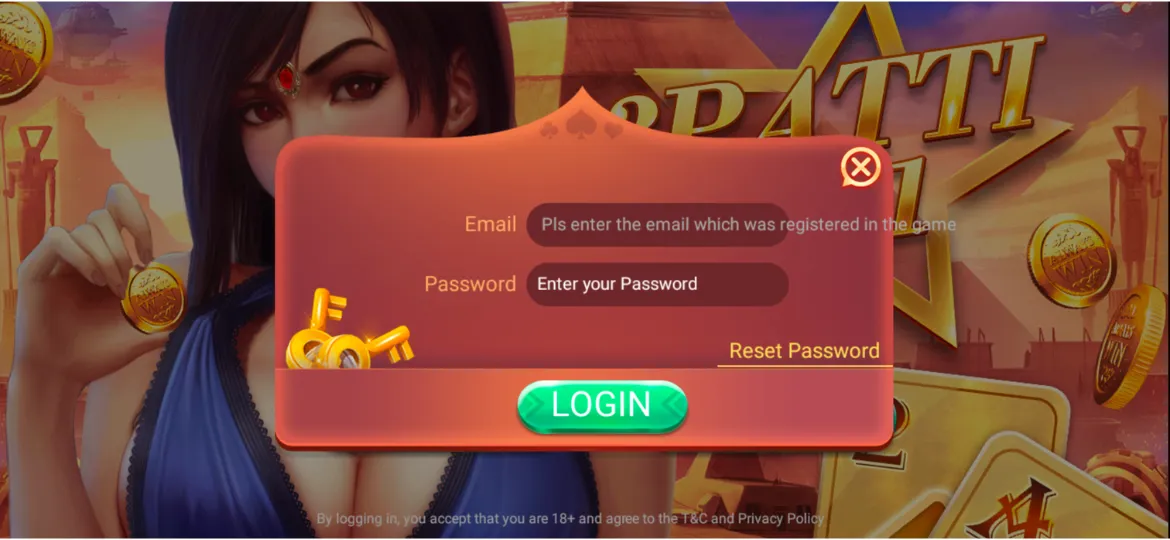
Open the official website or app installed on your phone.
Use the Login button instead of creating another account.
Enter the same number/account information used when you signed up.
Type your password carefully.
Once the details are correct, continue to your account dashboard.
Use the number connected to your account.
Use your current account password.
A stable connection helps prevent the login screen from getting stuck.
Check spelling and make sure Caps Lock or an extra space is not affecting the password.
Make sure you're using the same number you registered with.
Refresh/reopen the app and check your internet connection.
Wait briefly, check the entered number, then request the OTP again if that option is available.
Avoid repeatedly entering the wrong password. Use password recovery or support.
Close the app completely, reopen it, or update it if an updated version is available.
Step 1: Open Login
Step 2: Tap Forgot Password
Step 3: Enter your registered mobile number
Step 4: Complete the verification/OTP step
Step 5: Create a new password
Step 6: Return to Login and sign in again
| Login Option | What to Enter |
|---|---|
| Mobile Number | Registered phone number |
| Password | Current account password |
| OTP | Only when requested |
1. Install/open 3 Patti No1 on the new device.
2. Choose Login, not Sign Up.
3. Enter your existing account details.
4. Complete verification if requested.
5. Check that your existing account/balance has loaded.
Do not create another account just because you're using a new phone.
View available 3 Patti No1 games.
Add balance using an available payment method.
Submit a withdrawal from your wallet.
Check previous deposits and withdrawals.
| Login | Sign Up |
|---|---|
| For an existing account | For a new account |
| Uses existing details | Creates new details |
| Opens your current account | Creates another account |
Need a new account? Head to the 3 Patti No1 Signup page.
Before contacting support, have:
Open the app, select Login, and enter your registered mobile number and password.
Yes, your registered mobile number is the primary way to access your account.
Use the Forgot Password option on the login screen to receive an OTP and reset it.
Check your internet connection, ensure your details are correct, and verify you are using the latest version of the app.
Yes, simply download the app on the new phone and enter your existing login details.
Network delays can cause this. Wait a few moments, check your signal, and request it again.
No, creating multiple accounts is not recommended. Instead, reset your password or contact support to recover your existing account.
You can deposit money from the main dashboard inside the app using the Deposit section.
Your current balance will be displayed at the top of the screen on your dashboard.
Open the settings or profile menu within the app and select the Logout option.